> ## Documentation Index
> Fetch the complete documentation index at: https://docs.spikeapi.com/llms.txt
> Use this file to discover all available pages before exploring further.
# Provider Integration
> Integration with providers
Most providers (e.g., Garmin, Fitbit) require the user to grant consent before Spike API can access their data. Redirect the user to the provider's consent page using a URL obtained via the API. Other providers rely on SDK functionality for integration and data extraction. Refer to SDK Documentation for Apple Health, Health Connect & Samsung Health Data integrations.
## Step 1: Configure Redirect URL in Admin Console
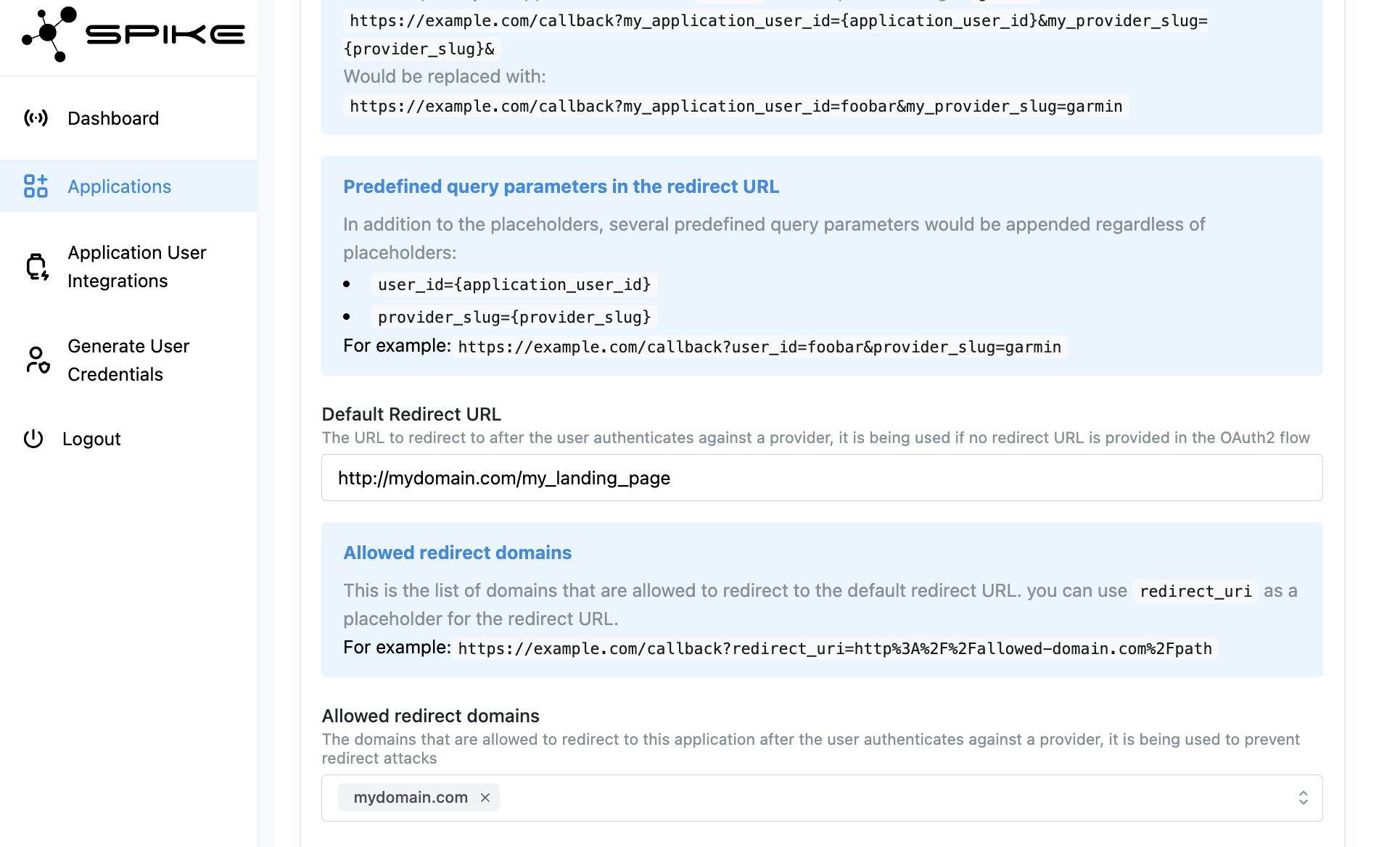
To configure the redirect URL in the admin console, navigate to the "Applications" section and locate the "Redirect URLs" option within your application. Here, you can either specify a default redirect URL or add multiple domains to the whitelist which would allow you to define your own redirect URL during the integration process.
 ## Step 2: Obtain Redirect URL
```mermaid theme={null}
sequenceDiagram
participant A as Your App
participant S as Spike API
participant P as Provider (e.g., Fitbit)
participant U as End User
A->>+S: GET /providers/{provider}/integration/init_url
## Step 2: Obtain Redirect URL
```mermaid theme={null}
sequenceDiagram
participant A as Your App
participant S as Spike API
participant P as Provider (e.g., Fitbit)
participant U as End User
A->>+S: GET /providers/{provider}/integration/init_url
Authorization: Bearer
S-->>-A: 200 OK
Integration URL
A->>U: Redirect to integration URL
U->>+P: User authorizes data access
P-->>-U: Authorization granted
P->>S: Provider sends authorization code
S->>A: Redirect user to your app
with success confirmation
Note over S: Provider integration
is now active for user
```
When you want to initiate the integration process for an end user, you can use the following endpoint to get a redirect URL for a specific provider.
### Query arguments
* (Optional) **redirect\_uri** URI to redirect the end user after integration is complete, domain must be **whitelisted** in the admin console.
* (Optional) **state** an arbitrary string that would be returned to you after integration is complete.
* (Optional) **provider\_user\_id** an id of application users at a specific provider. For e.g., Ultrahuman requires to pass email.
### Example Request
```bash theme={null}
curl -X GET https://app-api.spikeapi.com/v3/providers/fitbit/integration/init_url -H 'Authorization: Bearer '
```
### Example Response
```json theme={null}
{
"provider_slug": "fitbit",
"path": "https://app-api.spikeapi.com/v3/providers/fitbit/integration/init/ic/la54yZgBJYlokLDHjh_NRpR6HOfFxkGKwEdRWL93gE0DnqBBqGded5SIcdZVAEdLDO-bGYheFBxZly9Q"
}
```
## Redirect the User
Redirect the user to the **path** URL provided in the response. This allows them to authorize data access. Once the user is integrated, they would be redirected back to your application either using the default redirect URL or using the **redirect\_uri** provided in your request to the API.