> ## Documentation Index
> Fetch the complete documentation index at: https://docs.spikeapi.com/llms.txt
> Use this file to discover all available pages before exploring further.
# Nutrition AI Implementation Guide
> Complete code examples and integration patterns for the Nutrition API
## About
This guide provides complete implementation details and best practices for integrating the Nutrition API into your applications. For detailed API specifications and data types, refer to the [API Reference](/api-reference/nutrition-ai-analyze-nutrition-image).
**Authentication**: The code examples in this guide focus on the nutrition analysis functionality. For authentication implementation details, see the [Authentication documentation](/api-docs/authentication). You'll need to add Bearer token into the Authorization header to all API requests.
## API Endpoints
The Nutrition API provides these endpoints for managing nutrition records:
* **[`POST /nutrition_records/image`](/api-reference/nutrition-ai-analyze-nutrition-image)** — upload a food image for AI-powered nutritional analysis
* **[`POST /nutrition_records/ingredients/label`](/api-reference/nutrition-ai-analyze-nutrition-label)** — upload an image of a nutritional facts label to analyze it
* **[`POST /nutrition_records/manual`](/api-reference/nutrition-ai-upload-nutrition-record)** — upload a manually created nutrition record
* **[`PATCH /nutrition_records/{id}`](/api-reference/nutrition-ai-modify-nutrition-record)** — change the portion size for a nutrition record by ID
* **[`PUT /nutrition_records/{id}`](/api-reference/nutrition-ai-replace-nutrition-record)** — replace the nutrition record with a new one
* **[`GET /nutrition_records`](/api-reference/nutrition-ai-list-nutrition-records)** — retrieve a list of nutrition records by the time range
* **[`GET /nutrition_records/{id}`](/api-reference/nutrition-ai-get-nutrition-record)** — retrieve a specific nutrition record by ID
* **[`DELETE /nutrition_records/{id}`](/api-reference/nutrition-ai-delete-nutrition-record)** — delete a specific nutrition record by ID
## Image Preparation
For optimal image capture guidelines, see the [Image Guidelines](/nutrition-ai/overview#image-guidelines) in the API overview.
## POST Request Body
### Processing Modes
The processing mode is controlled by the `wait_on_process` parameter. The API supports two processing modes, each suited for a different use case:
#### Asynchronous Processing
Returns immediately and processes the image in the background. Ideal for user-facing applications where immediate feedback is important. See the [Asynchronous Processing](/nutrition-ai/async) guide for complete implementation details, webhook configuration, and code examples.
#### Synchronous Processing
```mermaid theme={null}
%%{init: {"theme": "base", "themeVariables": {"primaryColor": "#ffffff", "primaryTextColor": "#161a1d", "primaryBorderColor": "#ded1e4", "lineColor": "#006ad4", "secondaryColor": "#f2f6f9", "tertiaryColor": "#eef1f4", "background": "#ffffff", "mainBkg": "#ffffff", "secondBkg": "#f2f6f9", "actorBkg": "#eef1f4", "actorTextColor": "#161a1d", "actorLineColor": "#006ad4", "signalColor": "#006ad4", "signalTextColor": "#161a1d", "labelBoxBkgColor": "#ffffff", "labelTextColor": "#4f5356", "loopTextColor": "#4f5356", "noteBkgColor": "#f2f6f9", "noteTextColor": "#4f5356", "activationBkgColor": "#ded1e4", "activationBorderColor": "#9ea1a5"}}}%%
sequenceDiagram
participant A as App
participant S as Spike API
A->>+S: POST /auth/hmac
HMAC signature
S-->>-A: Access Token
A->>+S: POST /nutrition_records
Base64 image + token (wait_on_process: true)
activate S
S-->>A: 200 OK
Complete nutrition analysis with status: "completed"
deactivate S
S->>-A: POST webhook URL
Complete nutrition results
activate A
A-->>+S: 200 OK
deactivate A
```
Waits for complete analysis before responding. Best for batch processing, server-to-server integrations, or when you can handle longer response times:
**Request:**
```json theme={null}
{
"body": "base64-encoded-image-data",
"analysis_mode": "fast",
"wait_on_process": true
}
```
**Response:**
```json theme={null}
{
"record_id": "6ba7b810-9dad-11d1-80b4-00c04fd430c8",
"status": "completed",
"dish_name": "grilled chicken caesar salad",
"serving_size": 275,
"unit": "g",
"nutritional_fields": {
"energy_kcal": 292,
"protein_g": 42.2,
"fat_total_g": 10.9,
"carbohydrate_g": 4.3
},
"uploaded_at": "2025-09-15T10:30:04.521Z",
"modified_at": "2025-09-15T10:30:12.132Z",
"consumed_at": "2025-09-15T10:30:04Z"
}
```
### Analysis Modes
* **`precise`** (default) — uses advanced AI models for the highest accuracy and detailed analysis
* **`fast`** — uses optimized models for quicker processing with good accuracy
### Localization
Provide `country_code` and `language_code` for region-specific analysis:
```json theme={null}
{
"country_code": "de",
"language_code": "de",
"include_dish_description": true
}
```
Note, both codes should be lowercase.
This enables:
* Region-specific food recognition
* Usage of local nutritional databases
* Translated ingredient names and descriptions
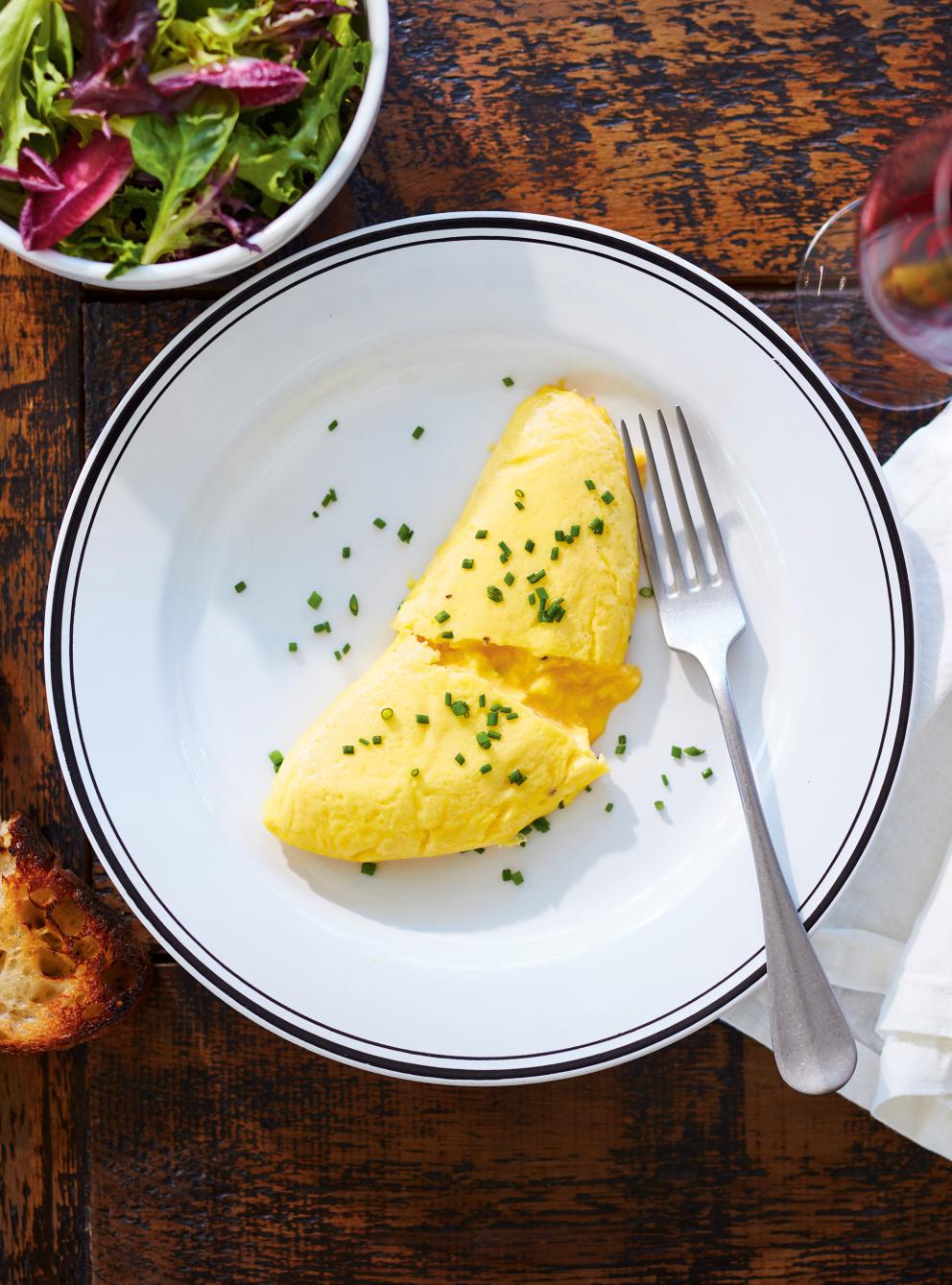 ```json Request Body theme={null}
{
"include_dish_description": true,
"include_ingredients": true,
"wait_on_process": true,
"country_code": "fr",
"language_code": "fr",
"body_url": "https://images.ricardocuisine.com/services/recipes/992x1340_9168.jpg"
}
```
```json Response Body theme={null}
{
"record_id": "013501f8-da8f-88ed-8ef8-a21ad5d0e7bf",
"status": "completed",
"dish_name": "french omelette with mixed salad",
"dish_description": "a classic French omelette made with whisked eggs, gently cooked for a soft texture, garnished with chives, served with a side of mixed green salad and a slice of toasted bread",
"dish_name_translated": "Omelette française avec salade composée",
"dish_description_translated": "Une omelette française classique, préparée avec des œufs battus, cuite doucement pour une texture moelleuse, garnie de ciboulette, servie avec une salade verte composée et une tranche de pain grillé.",
"serving_size": 197,
"unit": "g",
"nutritional_fields": {
"carbohydrate_g": 18.3,
"energy_kcal": 288,
"fat_total_g": 15.4,
"protein_g": 17.3
},
"ingredients": [
{
"name": "egg, whole, cooked, omelette",
"name_translated": "œuf entier cuit en omelette",
"serving_size": 120,
"unit": "g",
"nutritional_fields": {
"carbohydrate_g": 2.4,
"energy_kcal": 185,
"fat_total_g": 14.1,
"protein_g": 13.3
}
},
{
"name": "chives, raw",
"name_translated": "ciboulette crue",
"serving_size": 2,
"unit": "g",
"nutritional_fields": {
"carbohydrate_g": 0.2,
"energy_kcal": 1,
"protein_g": 0.1
}
},
{
"name": "lettuce, mixed salad greens, raw",
"name_translated": "laitue, salades composées, crues",
"serving_size": 40,
"unit": "g",
"nutritional_fields": {
"carbohydrate_g": 0.7,
"energy_kcal": 7,
"fat_total_g": 0.1,
"protein_g": 0.8
}
},
{
"name": "bread, white, toasted",
"name_translated": "pain blanc grillé",
"serving_size": 35,
"unit": "g",
"nutritional_fields": {
"carbohydrate_g": 15,
"energy_kcal": 95,
"fat_total_g": 1.2,
"protein_g": 3.1
}
}
],
"uploaded_at": "2025-09-15T12:51:41.886Z",
"modified_at": "2025-09-15T12:51:49.861Z",
"consumed_at": "2025-09-15T12:51:41Z"
}
```
### Including Optional Data
Control what data is included in the analysis:
```json theme={null}
{
"include_nutri_score": true,
"include_dish_description": true,
"include_ingredients": true,
"include_nutrition_fields": [
"energy_kcal",
"protein_g",
"fat_total_g",
"carbohydrate_g",
"fiber_total_dietary_g",
"sodium_mg",
"calcium_mg",
"iron_mg"
]
}
```
#### Selection of Nutritional Fields
You can control which nutritional fields are included in the analysis:
```json theme={null}
{
"include_nutrition_fields": [
"energy_kcal",
"protein_g",
"fat_total_g",
"carbohydrate_g",
"fiber_total_dietary_g",
"sodium_mg",
"calcium_mg",
"vitamin_c_mg"
]
}
```
**Note**: If `include_nutrition_fields` is omitted or empty, only four basic fields are included by default:
* `carbohydrate_g`
* `energy_kcal`
* `fat_total_g`
* `protein_g`
## Response Body
### Processing Status
Analysis of the nutrition record progresses through these states:
* **pending** — analysis has been queued
* **processing** — an AI model is actively analyzing the image
* **completed** — analysis finished successfully with results
* **failed** — processing failed due to unidentifiable content or technical issues
* **updated** — an existing record was updated with a new serving size or fully replaced
REST API responses and webhook notifications will always include the `status` field.
```json theme={null}
{
"record_id": "0135012d-a9f5-8bf6-885f-8badcaf8d203",
"status": "processing",
"uploaded_at": "2025-09-15T20:02:01.049Z",
"modified_at": "2025-09-15T20:02:01.05Z",
"consumed_at": "2025-09-15T20:02:01Z"
}
```
Webhook notifications can have `status` field with values `completed`, `updated` or `failed`. Always handle different response statuses in your application logic.
### Error Scenarios
#### Processing Failures
These occur when the API successfully receives your request but the AI analysis fails. The response will have HTTP 200 status with `"status": "failed"`.
When `status` is `failed`, check the `failure_reason` field for specific details:
* **Unidentifiable food items** — image contains non-food objects or unclear food items
```json theme={null}
"status": "failed",
"dish_name": "unidentifiable",
"failure_reason": "no food items visible; image depicts landmark (Eiffel Tower)",
```
* **Poor image quality** — blurry, dark, or low-resolution images
```json theme={null}
"status": "failed",
"dish_name": "unidentifiable",
"failure_reason": "image too blurry to identify any food items clearly",
```
* **AI processing timeouts** — although AI providers typically have fast [Response Times](/nutrition-ai/overview#response-times), processing may occasionally take longer than expected due to reasons that cannot be foreseen.
To manage this, the upload process will time out if synchronous processing takes longer than 3 minutes and asynchronous processing takes longer than 5 minutes.
Once timeout occurs, the API will return HTTP status 200 and the body message with the `status` field set to `failed`:
```json theme={null}
{
"record_id": "013501f7-1ad0-8c25-82ae-fc843ead4135",
"status": "failed",
"failure_reason": "nutrition processing timed out",
"uploaded_at": "2025-09-15T20:48:19.731Z",
"modified_at": "2025-09-15T20:51:04.815Z",
"consumed_at": "2025-09-15T20:48:19Z"
}
```
#### Request Errors
These occur when there's an issue with the request itself, returning non-200 HTTP status codes before analysis begins.
* **Decoding Image Error** — if the image is corrupted or improperly encoded, and therefore cannot be decoded, then HTTP 400 will be returned.
```json theme={null}
{
"title": "Bad Request",
"status": 400,
"detail": "failed to base64 decode body"
}
```
* **Invalid Image Format** — nutrition AI supports JPEG, PNG, and WebP formats. When an image format is not supported, HTTP status code 400 will be returned.
```json theme={null}
{
"title": "Bad Request",
"status": 400,
"detail": "unsupported mime type: image/gif"
}
```
* **Exceeding Image Size Limits** — images larger than 10MB are not accepted, and API will return HTTP 413 status code.
```json theme={null}
{
"title": "Request Entity Too Large",
"status": 413,
"detail": "request body is too large limit=10485760 bytes"
}
```
Images larger than 11MB will be rejected by the gateway with HTTP 413 status code and the following error message.
```text theme={null}
413 Request Entity Too Large
```
* **Invalid Image URLs** — when image is provided with the `body_url` parameter and the URL path is not found at the host, HTTP status code 422 will be returned.
```json theme={null}
{
"title": "Unprocessable Entity",
"status": 422,
"detail": "failed to GET body_url: status 404"
}
```
If the `body_url` parameter value is not a proper HTTP(S) URL, the following error will be given.
```json theme={null}
{
"title": "Unprocessable Entity",
"status": 422,
"detail": "validation failed",
"errors": [
{
"message": "body_url must be a valid HTTP(S) URL",
"location": "body.body_url",
"value": "example.com/image.jpeg"
}
]
}
```
For general API error handling, see the [Error Handling documentation](/api-docs/errors).
### Nutrition Fields and Units
The names of nutrition fields are always lowercase and include units as suffix. Nutrition fields are not translated.
## Custom Nutrition Records
A full set of Nutrition AI endpoints allows sophisticated users to define their own nutrition records flexibly and precisely.
Extracting nutrition details from nutrition facts labels lets users build up their own nutrition records from multiple ingredients.
This is useful when users have existing nutritional data, follow recipes, or want to add custom items to the analyzed nutrition records.
### Creating Nutrition Records Manually
[`POST /nutrition_records/manual`](/api-reference/nutrition-ai-upload-nutrition-record) endpoint allows you to define a full nutrition record with all ingredients and their respective nutritional fields:
* Dish name and description including translation
* Serving size and unit
* Complete nutritional fields
* Individual ingredients with their nutritional breakdown
* Consumption timestamp
### Updating Nutrition Records
Once a nutrition record exists (whether created manually or via AI analysis), you can update it in several ways:
#### 1. Changing Serving Size
Use [`PATCH /nutrition_records/{id}`](/api-reference/nutrition-ai-modify-nutrition-record) endpoint to adjust the portion size while maintaining the same nutritional ratios.
All ingredients and their respective nutritional fields will be automatically recalculated proportionally.
This allows you to easily adjust portion sizes while maintaining accurate nutritional information.
#### 2. Updating the Consumption Time
Use [`PATCH /nutrition_records/{id}`](/api-reference/nutrition-ai-modify-nutrition-record) endpoint to add or update the time of consumption.
#### 3. Replacing Full Record
Use [`PUT /nutrition_records/{id}`](/api-reference/nutrition-ai-replace-nutrition-record) to completely replace a record with new data, including different ingredients and nutritional values.
A response will include an `input_type` field with value `manual` to indicate that the record was fully replaced.
The record preserves the record ID only. The `consumed_at` and `user_time_offset_minutes` field values are updated
either with newly provided values or set to defaults — the same as for a new record.
### Getting Results
For asynchronous processing, use webhooks for real-time notifications. See the [Asynchronous Processing Guide](/nutrition-ai/async) for complete webhook implementation details.
If webhooks are not yet available, you can check status using the [`GET /nutrition_records/{id}`](/api-reference/nutrition-ai-get-nutrition-record) endpoint.
Retrospectively, a list of all analyzed nutrition records can be retrieved using the [`GET /nutrition_records`](/api-reference/nutrition-ai-list-nutrition-records) endpoint by providing the time range.
## Deleting Results
A result can be deleted using [`DETELE /nutrition_records/{id}`](/api-reference/nutrition-ai-delete-nutrition-record) endpoint by providing the record ID.
An HTTP 204 status code will be returned if successful, regardless if the record existed or not.
## Best Practices
### 1. Choose the Right Processing Mode
* **Asynchronous**: For user-facing applications, mobile apps, and when you want immediate feedback
* **Synchronous**: For batch processing, server-to-server integrations, and when you can handle longer response times
### 2. Implement Proper Error Handling
* Handle network errors gracefully
* Provide meaningful error messages to users
* Implement retry logic for transient failures
## Code Examples
Here are complete implementation examples in multiple programming languages:
```python [Python] theme={null}
import os
import requests
import base64
import hmac
import hashlib
import json
SPIKE_API_BASE_URL = os.getenv("SPIKE_API_BASE_URL")
SPIKE_APP_HMAC_KEY = os.getenv("SPIKE_APP_HMAC_KEY")
try:
SPIKE_APP_ID = int(os.getenv("SPIKE_APP_ID"))
except (ValueError, TypeError):
raise ValueError("SPIKE_APP_ID must be an integer.")
# Implementation depends on your authentication method
# See: /api-docs/authentication for complete details
class SpikeAuth:
def __init__(self, end_user_id):
self.user_id = end_user_id
self.app_id = SPIKE_APP_ID
self.hmac_key = SPIKE_APP_HMAC_KEY
self.base_url = SPIKE_API_BASE_URL
self.hmac_signature = self._generate_hmac_signature()
self.access_token = None
def _generate_hmac_signature(self):
h = hmac.new(self.hmac_key.encode('utf-8'), self.user_id.encode('utf-8'), hashlib.sha256)
return h.hexdigest()
def get_bearer_token(self) -> str:
if self.access_token is not None:
return self.access_token
else:
body = {
"application_id": self.app_id,
"application_user_id": self.user_id,
"signature": self.hmac_signature
}
response = requests.post(
f"{self.base_url}/auth/hmac",
json=body,
headers={"Content-Type": "application/json", "Accept": "application/json"},
timeout=20
)
if response.status_code == 200:
try:
print(f"Successfully obtained Bearer token for {self.user_id}")
self.access_token = response.json()["access_token"]
return self.access_token
except (KeyError, json.JSONDecodeError) as e:
print(f"Failed to parse access token from successful response for {self.user_id}: {e}")
raise requests.RequestException(f"Token parsing failed for {self.user_id}")
else:
raise Exception(f"Authentication failed for {self.user_id} with status {response.status_code}")
class NutritionAPI:
def __init__(self, auth : SpikeAuth):
self.spike_auth = auth
def _create_auth_headers(self, method="GET") -> dict[str, str]:
"""Create authentication headers - see authentication docs for details"""
try:
token = self.spike_auth.get_bearer_token()
req_headers = {
"Authorization": f"Bearer {token}",
"Accept": "application/json"
}
if method == "POST":
req_headers["Content-Type"] = "application/json"
return req_headers
except requests.RequestException as auth_error:
print(f"Failed to get bearer token for Nutrition API request header: {auth_error}")
raise
def analyze_food_image(self, image_path, **options):
"""Upload a food image for nutritional analysis"""
# Read and encode image
try:
with open(image_path, 'rb') as image_file:
image_data = base64.b64encode(image_file.read()).decode('utf-8')
except FileNotFoundError:
print(f"Image file not found: {image_path}")
return None
# Prepare the request body
body = {
"body": image_data,
"analysis_mode": options.get("analysis_mode", "precise"),
"country_code": options.get("country_code", "us"),
"language_code": options.get("language_code", "en"),
"include_ingredients": options.get("include_ingredients", False),
"include_nutri_score": options.get("include_nutri_score", True),
"include_dish_description": options.get("include_dish_description", True),
"ignore_cache": options.get("ignore_cache", False),
"include_nutrition_fields": options.get("include_nutrition_fields", [
"energy_kcal", "protein_g", "fat_total_g", "carbohydrate_g",
"fiber_total_dietary_g", "sodium_mg"
]),
"wait_on_process": options.get("wait_on_process", False)
}
# Create request body and headers
body_json = json.dumps(body)
headers = self._create_auth_headers(method="POST")
# Make request
response = requests.post(
f"{SPIKE_API_BASE_URL}/nutrition_records",
headers=headers,
data=body_json
)
if response.status_code == 200:
return response.json()
print(f"Response status: {response.status_code}")
if response.status_code == 400:
print(f"Bad request. Response: {response.text}")
elif response.status_code == 401:
print(f"Unauthorized for Nutrition API. Token expired or invalid. Response: {response.text}")
self.spike_auth.access_token = None
elif response.status_code == 404:
print(f"Resource not found")
elif response.status_code == 413:
print(f"Encoded picture exceeds 10MB. Response: {response.text}")
elif response.status_code == 422:
print(f"Invalid parameters. Response: {response.text}")
elif response.status_code == 500:
print(f"Internal server error - contact Spike support. Response: {response.text}")
return None
def print_result(res):
if res is not None:
print(f"Status: {res['status']}. Record ID: {res['record_id']}")
if res['status'] == 'failed':
print(f"Error: {res['failure_reason']}")
elif res['status'] == 'completed':
print(f"Dish: {res['dish_name']}")
if 'dish_name_translated' in res.keys():
print(f"Dish translated: {res['dish_name_translated']}")
if 'dish_description' in res.keys():
print(f"Description: {res['dish_description']}")
if 'dish_description_translated' in res.keys():
print(f"Description translated: {res['dish_description_translated']}")
print(f"Serving size: {res['serving_size']} {res['unit']} ")
if 'nutri_score' in res.keys():
print(f"Nutri-Score: {res['nutri_score']}")
if 'nutritional_fields' in res.keys():
print("Nutritional fields:")
for field in res['nutritional_fields']:
print(f"- {field}: {res['nutritional_fields'].get(field)}")
if 'ingredients' in res.keys():
print("Ingredients:")
for ingredient in res.get('ingredients'):
print(f"- {ingredient['name']}: {ingredient['serving_size']}{ingredient['unit']}")
if 'nutritional_fields' in ingredient.keys():
for field in ingredient['nutritional_fields']:
print(f" + {field}: {ingredient['nutritional_fields'].get(field)}")
# Example usage
user_id = "nutrition_test_user"
spike_auth = SpikeAuth(user_id)
api = NutritionAPI(spike_auth)
# Upload image asynchronously
print(f"Asynchronous analysis")
result = api.analyze_food_image(
"/path/to/image.jpg.jpg",
include_ingredients=True
)
print_result(result)
# For synchronous processing (wait for results)
print(f"\nSynchronous analysis")
result = api.analyze_food_image(
"/path/to/image.jpg.jpg",
wait_on_process=True,
include_ingredients=True,
language_code="de",
country_code="de"
)
print_result(result)
```
```javascript [JavaScript] theme={null}
const crypto = require('crypto');
const fs = require('fs');
const axios = require('axios');
class NutritionAPI {
constructor(apiKey, baseUrl = 'https://api.spikeapi.com') {
this.apiKey = apiKey;
this.baseUrl = baseUrl;
}
createAuthHeaders() {
// Create authentication headers - see /api-docs/authentication for details
// Implementation depends on your authentication method
return {};
}
async uploadFoodImage(imagePath, options = {}) {
// Read and encode image
const imageBuffer = fs.readFileSync(imagePath);
const imageBase64 = imageBuffer.toString('base64');
// Prepare the request body
const body = {
body: imageBase64,
analysis_mode: options.analysisMode || 'precise',
country_code: options.countryCode || 'us',
language_code: options.languageCode || 'en',
include_ingredients: options.includeIngredients !== false,
include_nutri_score: options.includeNutriScore !== false,
include_dish_description: options.includeDishDescription !== false,
include_nutrition_fields: options.includeNutritionFields || [
'energy_kcal', 'protein_g', 'fat_total_g', 'carbohydrate_g',
'fiber_total_dietary_g', 'sodium_mg'
],
wait_on_process: options.waitOnProcess || false
};
// Create request body and headers
const bodyJson = JSON.stringify(body);
const authHeaders = this.createAuthHeaders();
const headers = {
'Content-Type': 'application/json',
...authHeaders
// See /api-docs/authentication for authentication details
};
// Make request
try {
const response = await axios.post(
`${this.baseUrl}/nutrition_records`,
bodyJson,
{ headers }
);
return response.data;
} catch (error) {
throw new Error(`API request failed: ${error.response?.data?.message || error.message}`);
}
}
}
// Example usage
async function analyzeFood() {
const api = new NutritionAPI('your-api-key');
try {
// Asynchronous analysis (recommended)
const result = await api.uploadFoodImage('path/to/food-image.jpg', {
includeIngredients: true,
includeNutriScore: true,
countryCode: 'us'
});
console.log(`Analysis started. Record ID: ${result.record_id}`);
console.log(`Status: ${result.status}`);
// Synchronous analysis (wait for results)
const syncResult = await api.uploadFoodImage('path/to/food-image.jpg', {
waitOnProcess: true,
includeIngredients: true
});
if (syncResult.status === 'completed') {
const nutritionData = syncResult.result;
console.log(`Dish: ${nutritionData.dish_name}`);
console.log(`Nutri-Score: ${nutritionData.nutri_score}`);
nutritionData.ingredients?.forEach(ingredient => {
console.log(`- ${ingredient.name}: ${ingredient.serving_size}${ingredient.unit}`);
});
}
} catch (error) {
console.error('Error:', error.message);
}
}
analyzeFood();
```
```go [Go] theme={null}
package main
import (
"bytes"
"crypto/hmac"
"crypto/sha256"
"encoding/base64"
"encoding/hex"
"encoding/json"
"fmt"
"io"
"net/http"
"os"
"strconv"
"time"
)
type NutritionAPI struct {
APIKey string
BaseURL string
}
type UploadRequest struct {
Body string `json:"body"`
AnalysisMode string `json:"analysis_mode"`
CountryCode string `json:"country_code"`
LanguageCode string `json:"language_code"`
IncludeIngredients bool `json:"include_ingredients"`
IncludeNutriScore bool `json:"include_nutri_score"`
IncludeDishDescription bool `json:"include_dish_description"`
IncludeNutritionFields []string `json:"include_nutrition_fields"`
WaitOnProcess bool `json:"wait_on_process"`
}
type UploadResponse struct {
ApplicationID int64 `json:"application_id"`
UID string `json:"uid"`
RecordID string `json:"record_id"`
Status string `json:"status"`
Result *NutritionRecord `json:"result,omitempty"`
Error string `json:"error,omitempty"`
UploadedAt time.Time `json:"uploaded_at"`
}
type NutritionRecord struct {
RecordID string `json:"record_id"`
Status string `json:"status"`
DishName string `json:"dish_name"`
NutriScore string `json:"nutri_score"`
ServingSize float64 `json:"serving_size"`
Unit string `json:"unit"`
NutritionalFields map[string]float64 `json:"nutritional_fields"`
Ingredients []NutritionIngredient `json:"ingredients"`
UploadedAt time.Time `json:"uploaded_at"`
}
type NutritionIngredient struct {
Name string `json:"name"`
ServingSize float64 `json:"serving_size"`
Unit string `json:"unit"`
NutritionalFields map[string]float64 `json:"nutritional_fields"`
}
func NewNutritionAPI(apiKey string) *NutritionAPI {
return &NutritionAPI{
APIKey: apiKey,
BaseURL: "https://api.spikeapi.com",
}
}
func (api *NutritionAPI) createAuthHeaders() map[string]string {
// Create authentication headers - see /api-docs/authentication for details
// Implementation depends on your authentication method
return map[string]string{
"Content-Type": "application/json",
// Add authentication headers here
}
}
func (api *NutritionAPI) UploadFoodImage(imagePath string, options UploadRequest) (*UploadResponse, error) {
// Read and encode image
imageData, err := os.ReadFile(imagePath)
if err != nil {
return nil, fmt.Errorf("failed to read image: %w", err)
}
options.Body = base64.StdEncoding.EncodeToString(imageData)
// Set defaults
if options.AnalysisMode == "" {
options.AnalysisMode = "precise"
}
if options.CountryCode == "" {
options.CountryCode = "us"
}
if options.LanguageCode == "" {
options.LanguageCode = "en"
}
if options.IncludeNutritionFields == nil {
options.IncludeNutritionFields = []string{
"energy_kcal", "protein_g", "fat_total_g", "carbohydrate_g",
"fiber_total_dietary_g", "sodium_mg",
}
}
// Create a request body
bodyBytes, err := json.Marshal(options)
if err != nil {
return nil, fmt.Errorf("failed to marshal request: %w", err)
}
// Create request
req, err := http.NewRequest("POST", api.BaseURL+"/nutrition_records", bytes.NewBuffer(bodyBytes))
if err != nil {
return nil, fmt.Errorf("failed to create request: %w", err)
}
// Set headers
authHeaders := api.createAuthHeaders()
for key, value := range authHeaders {
req.Header.Set(key, value)
}
// See /api-docs/authentication for authentication details
// Make request
client := &http.Client{Timeout: 60 * time.Second}
resp, err := client.Do(req)
if err != nil {
return nil, fmt.Errorf("request failed: %w", err)
}
defer resp.Body.Close()
// Parse response
respBody, err := io.ReadAll(resp.Body)
if err != nil {
return nil, fmt.Errorf("failed to read response: %w", err)
}
var result UploadResponse
if err := json.Unmarshal(respBody, &result); err != nil {
return nil, fmt.Errorf("failed to parse response: %w", err)
}
return &result, nil
}
func main() {
api := NewNutritionAPI("your-api-key")
// Asynchronous analysis
result, err := api.UploadFoodImage("path/to/food-image.jpg", UploadRequest{
IncludeIngredients: true,
IncludeNutriScore: true,
CountryCode: "us",
})
if err != nil {
fmt.Printf("Error: %v\n", err)
return
}
fmt.Printf("Analysis started. Record ID: %s\n", result.RecordID)
fmt.Printf("Status: %s\n", result.Status)
// Synchronous analysis
syncResult, err := api.UploadFoodImage("path/to/food-image.jpg", UploadRequest{
WaitOnProcess: true,
IncludeIngredients: true,
})
if err != nil {
fmt.Printf("Error: %v\n", err)
return
}
if syncResult.Status == "completed" && syncResult.Result != nil {
nutrition := syncResult.Result
fmt.Printf("Dish: %s\n", nutrition.DishName)
fmt.Printf("Nutri-Score: %s\n", nutrition.NutriScore)
for _, ingredient := range nutrition.Ingredients {
fmt.Printf("- %s: %.1f%s\n", ingredient.Name, ingredient.ServingSize, ingredient.Unit)
}
}
}
```
For complete API specification, data types, and additional parameters, see the [`POST /nutrition_records`](/api-reference/nutrition-ai-analyze-nutrition-image) API Reference.
```json Request Body theme={null}
{
"include_dish_description": true,
"include_ingredients": true,
"wait_on_process": true,
"country_code": "fr",
"language_code": "fr",
"body_url": "https://images.ricardocuisine.com/services/recipes/992x1340_9168.jpg"
}
```
```json Response Body theme={null}
{
"record_id": "013501f8-da8f-88ed-8ef8-a21ad5d0e7bf",
"status": "completed",
"dish_name": "french omelette with mixed salad",
"dish_description": "a classic French omelette made with whisked eggs, gently cooked for a soft texture, garnished with chives, served with a side of mixed green salad and a slice of toasted bread",
"dish_name_translated": "Omelette française avec salade composée",
"dish_description_translated": "Une omelette française classique, préparée avec des œufs battus, cuite doucement pour une texture moelleuse, garnie de ciboulette, servie avec une salade verte composée et une tranche de pain grillé.",
"serving_size": 197,
"unit": "g",
"nutritional_fields": {
"carbohydrate_g": 18.3,
"energy_kcal": 288,
"fat_total_g": 15.4,
"protein_g": 17.3
},
"ingredients": [
{
"name": "egg, whole, cooked, omelette",
"name_translated": "œuf entier cuit en omelette",
"serving_size": 120,
"unit": "g",
"nutritional_fields": {
"carbohydrate_g": 2.4,
"energy_kcal": 185,
"fat_total_g": 14.1,
"protein_g": 13.3
}
},
{
"name": "chives, raw",
"name_translated": "ciboulette crue",
"serving_size": 2,
"unit": "g",
"nutritional_fields": {
"carbohydrate_g": 0.2,
"energy_kcal": 1,
"protein_g": 0.1
}
},
{
"name": "lettuce, mixed salad greens, raw",
"name_translated": "laitue, salades composées, crues",
"serving_size": 40,
"unit": "g",
"nutritional_fields": {
"carbohydrate_g": 0.7,
"energy_kcal": 7,
"fat_total_g": 0.1,
"protein_g": 0.8
}
},
{
"name": "bread, white, toasted",
"name_translated": "pain blanc grillé",
"serving_size": 35,
"unit": "g",
"nutritional_fields": {
"carbohydrate_g": 15,
"energy_kcal": 95,
"fat_total_g": 1.2,
"protein_g": 3.1
}
}
],
"uploaded_at": "2025-09-15T12:51:41.886Z",
"modified_at": "2025-09-15T12:51:49.861Z",
"consumed_at": "2025-09-15T12:51:41Z"
}
```
### Including Optional Data
Control what data is included in the analysis:
```json theme={null}
{
"include_nutri_score": true,
"include_dish_description": true,
"include_ingredients": true,
"include_nutrition_fields": [
"energy_kcal",
"protein_g",
"fat_total_g",
"carbohydrate_g",
"fiber_total_dietary_g",
"sodium_mg",
"calcium_mg",
"iron_mg"
]
}
```
#### Selection of Nutritional Fields
You can control which nutritional fields are included in the analysis:
```json theme={null}
{
"include_nutrition_fields": [
"energy_kcal",
"protein_g",
"fat_total_g",
"carbohydrate_g",
"fiber_total_dietary_g",
"sodium_mg",
"calcium_mg",
"vitamin_c_mg"
]
}
```
**Note**: If `include_nutrition_fields` is omitted or empty, only four basic fields are included by default:
* `carbohydrate_g`
* `energy_kcal`
* `fat_total_g`
* `protein_g`
## Response Body
### Processing Status
Analysis of the nutrition record progresses through these states:
* **pending** — analysis has been queued
* **processing** — an AI model is actively analyzing the image
* **completed** — analysis finished successfully with results
* **failed** — processing failed due to unidentifiable content or technical issues
* **updated** — an existing record was updated with a new serving size or fully replaced
REST API responses and webhook notifications will always include the `status` field.
```json theme={null}
{
"record_id": "0135012d-a9f5-8bf6-885f-8badcaf8d203",
"status": "processing",
"uploaded_at": "2025-09-15T20:02:01.049Z",
"modified_at": "2025-09-15T20:02:01.05Z",
"consumed_at": "2025-09-15T20:02:01Z"
}
```
Webhook notifications can have `status` field with values `completed`, `updated` or `failed`. Always handle different response statuses in your application logic.
### Error Scenarios
#### Processing Failures
These occur when the API successfully receives your request but the AI analysis fails. The response will have HTTP 200 status with `"status": "failed"`.
When `status` is `failed`, check the `failure_reason` field for specific details:
* **Unidentifiable food items** — image contains non-food objects or unclear food items
```json theme={null}
"status": "failed",
"dish_name": "unidentifiable",
"failure_reason": "no food items visible; image depicts landmark (Eiffel Tower)",
```
* **Poor image quality** — blurry, dark, or low-resolution images
```json theme={null}
"status": "failed",
"dish_name": "unidentifiable",
"failure_reason": "image too blurry to identify any food items clearly",
```
* **AI processing timeouts** — although AI providers typically have fast [Response Times](/nutrition-ai/overview#response-times), processing may occasionally take longer than expected due to reasons that cannot be foreseen.
To manage this, the upload process will time out if synchronous processing takes longer than 3 minutes and asynchronous processing takes longer than 5 minutes.
Once timeout occurs, the API will return HTTP status 200 and the body message with the `status` field set to `failed`:
```json theme={null}
{
"record_id": "013501f7-1ad0-8c25-82ae-fc843ead4135",
"status": "failed",
"failure_reason": "nutrition processing timed out",
"uploaded_at": "2025-09-15T20:48:19.731Z",
"modified_at": "2025-09-15T20:51:04.815Z",
"consumed_at": "2025-09-15T20:48:19Z"
}
```
#### Request Errors
These occur when there's an issue with the request itself, returning non-200 HTTP status codes before analysis begins.
* **Decoding Image Error** — if the image is corrupted or improperly encoded, and therefore cannot be decoded, then HTTP 400 will be returned.
```json theme={null}
{
"title": "Bad Request",
"status": 400,
"detail": "failed to base64 decode body"
}
```
* **Invalid Image Format** — nutrition AI supports JPEG, PNG, and WebP formats. When an image format is not supported, HTTP status code 400 will be returned.
```json theme={null}
{
"title": "Bad Request",
"status": 400,
"detail": "unsupported mime type: image/gif"
}
```
* **Exceeding Image Size Limits** — images larger than 10MB are not accepted, and API will return HTTP 413 status code.
```json theme={null}
{
"title": "Request Entity Too Large",
"status": 413,
"detail": "request body is too large limit=10485760 bytes"
}
```
Images larger than 11MB will be rejected by the gateway with HTTP 413 status code and the following error message.
```text theme={null}
413 Request Entity Too Large
```
* **Invalid Image URLs** — when image is provided with the `body_url` parameter and the URL path is not found at the host, HTTP status code 422 will be returned.
```json theme={null}
{
"title": "Unprocessable Entity",
"status": 422,
"detail": "failed to GET body_url: status 404"
}
```
If the `body_url` parameter value is not a proper HTTP(S) URL, the following error will be given.
```json theme={null}
{
"title": "Unprocessable Entity",
"status": 422,
"detail": "validation failed",
"errors": [
{
"message": "body_url must be a valid HTTP(S) URL",
"location": "body.body_url",
"value": "example.com/image.jpeg"
}
]
}
```
For general API error handling, see the [Error Handling documentation](/api-docs/errors).
### Nutrition Fields and Units
The names of nutrition fields are always lowercase and include units as suffix. Nutrition fields are not translated.
## Custom Nutrition Records
A full set of Nutrition AI endpoints allows sophisticated users to define their own nutrition records flexibly and precisely.
Extracting nutrition details from nutrition facts labels lets users build up their own nutrition records from multiple ingredients.
This is useful when users have existing nutritional data, follow recipes, or want to add custom items to the analyzed nutrition records.
### Creating Nutrition Records Manually
[`POST /nutrition_records/manual`](/api-reference/nutrition-ai-upload-nutrition-record) endpoint allows you to define a full nutrition record with all ingredients and their respective nutritional fields:
* Dish name and description including translation
* Serving size and unit
* Complete nutritional fields
* Individual ingredients with their nutritional breakdown
* Consumption timestamp
### Updating Nutrition Records
Once a nutrition record exists (whether created manually or via AI analysis), you can update it in several ways:
#### 1. Changing Serving Size
Use [`PATCH /nutrition_records/{id}`](/api-reference/nutrition-ai-modify-nutrition-record) endpoint to adjust the portion size while maintaining the same nutritional ratios.
All ingredients and their respective nutritional fields will be automatically recalculated proportionally.
This allows you to easily adjust portion sizes while maintaining accurate nutritional information.
#### 2. Updating the Consumption Time
Use [`PATCH /nutrition_records/{id}`](/api-reference/nutrition-ai-modify-nutrition-record) endpoint to add or update the time of consumption.
#### 3. Replacing Full Record
Use [`PUT /nutrition_records/{id}`](/api-reference/nutrition-ai-replace-nutrition-record) to completely replace a record with new data, including different ingredients and nutritional values.
A response will include an `input_type` field with value `manual` to indicate that the record was fully replaced.
The record preserves the record ID only. The `consumed_at` and `user_time_offset_minutes` field values are updated
either with newly provided values or set to defaults — the same as for a new record.
### Getting Results
For asynchronous processing, use webhooks for real-time notifications. See the [Asynchronous Processing Guide](/nutrition-ai/async) for complete webhook implementation details.
If webhooks are not yet available, you can check status using the [`GET /nutrition_records/{id}`](/api-reference/nutrition-ai-get-nutrition-record) endpoint.
Retrospectively, a list of all analyzed nutrition records can be retrieved using the [`GET /nutrition_records`](/api-reference/nutrition-ai-list-nutrition-records) endpoint by providing the time range.
## Deleting Results
A result can be deleted using [`DETELE /nutrition_records/{id}`](/api-reference/nutrition-ai-delete-nutrition-record) endpoint by providing the record ID.
An HTTP 204 status code will be returned if successful, regardless if the record existed or not.
## Best Practices
### 1. Choose the Right Processing Mode
* **Asynchronous**: For user-facing applications, mobile apps, and when you want immediate feedback
* **Synchronous**: For batch processing, server-to-server integrations, and when you can handle longer response times
### 2. Implement Proper Error Handling
* Handle network errors gracefully
* Provide meaningful error messages to users
* Implement retry logic for transient failures
## Code Examples
Here are complete implementation examples in multiple programming languages:
```python [Python] theme={null}
import os
import requests
import base64
import hmac
import hashlib
import json
SPIKE_API_BASE_URL = os.getenv("SPIKE_API_BASE_URL")
SPIKE_APP_HMAC_KEY = os.getenv("SPIKE_APP_HMAC_KEY")
try:
SPIKE_APP_ID = int(os.getenv("SPIKE_APP_ID"))
except (ValueError, TypeError):
raise ValueError("SPIKE_APP_ID must be an integer.")
# Implementation depends on your authentication method
# See: /api-docs/authentication for complete details
class SpikeAuth:
def __init__(self, end_user_id):
self.user_id = end_user_id
self.app_id = SPIKE_APP_ID
self.hmac_key = SPIKE_APP_HMAC_KEY
self.base_url = SPIKE_API_BASE_URL
self.hmac_signature = self._generate_hmac_signature()
self.access_token = None
def _generate_hmac_signature(self):
h = hmac.new(self.hmac_key.encode('utf-8'), self.user_id.encode('utf-8'), hashlib.sha256)
return h.hexdigest()
def get_bearer_token(self) -> str:
if self.access_token is not None:
return self.access_token
else:
body = {
"application_id": self.app_id,
"application_user_id": self.user_id,
"signature": self.hmac_signature
}
response = requests.post(
f"{self.base_url}/auth/hmac",
json=body,
headers={"Content-Type": "application/json", "Accept": "application/json"},
timeout=20
)
if response.status_code == 200:
try:
print(f"Successfully obtained Bearer token for {self.user_id}")
self.access_token = response.json()["access_token"]
return self.access_token
except (KeyError, json.JSONDecodeError) as e:
print(f"Failed to parse access token from successful response for {self.user_id}: {e}")
raise requests.RequestException(f"Token parsing failed for {self.user_id}")
else:
raise Exception(f"Authentication failed for {self.user_id} with status {response.status_code}")
class NutritionAPI:
def __init__(self, auth : SpikeAuth):
self.spike_auth = auth
def _create_auth_headers(self, method="GET") -> dict[str, str]:
"""Create authentication headers - see authentication docs for details"""
try:
token = self.spike_auth.get_bearer_token()
req_headers = {
"Authorization": f"Bearer {token}",
"Accept": "application/json"
}
if method == "POST":
req_headers["Content-Type"] = "application/json"
return req_headers
except requests.RequestException as auth_error:
print(f"Failed to get bearer token for Nutrition API request header: {auth_error}")
raise
def analyze_food_image(self, image_path, **options):
"""Upload a food image for nutritional analysis"""
# Read and encode image
try:
with open(image_path, 'rb') as image_file:
image_data = base64.b64encode(image_file.read()).decode('utf-8')
except FileNotFoundError:
print(f"Image file not found: {image_path}")
return None
# Prepare the request body
body = {
"body": image_data,
"analysis_mode": options.get("analysis_mode", "precise"),
"country_code": options.get("country_code", "us"),
"language_code": options.get("language_code", "en"),
"include_ingredients": options.get("include_ingredients", False),
"include_nutri_score": options.get("include_nutri_score", True),
"include_dish_description": options.get("include_dish_description", True),
"ignore_cache": options.get("ignore_cache", False),
"include_nutrition_fields": options.get("include_nutrition_fields", [
"energy_kcal", "protein_g", "fat_total_g", "carbohydrate_g",
"fiber_total_dietary_g", "sodium_mg"
]),
"wait_on_process": options.get("wait_on_process", False)
}
# Create request body and headers
body_json = json.dumps(body)
headers = self._create_auth_headers(method="POST")
# Make request
response = requests.post(
f"{SPIKE_API_BASE_URL}/nutrition_records",
headers=headers,
data=body_json
)
if response.status_code == 200:
return response.json()
print(f"Response status: {response.status_code}")
if response.status_code == 400:
print(f"Bad request. Response: {response.text}")
elif response.status_code == 401:
print(f"Unauthorized for Nutrition API. Token expired or invalid. Response: {response.text}")
self.spike_auth.access_token = None
elif response.status_code == 404:
print(f"Resource not found")
elif response.status_code == 413:
print(f"Encoded picture exceeds 10MB. Response: {response.text}")
elif response.status_code == 422:
print(f"Invalid parameters. Response: {response.text}")
elif response.status_code == 500:
print(f"Internal server error - contact Spike support. Response: {response.text}")
return None
def print_result(res):
if res is not None:
print(f"Status: {res['status']}. Record ID: {res['record_id']}")
if res['status'] == 'failed':
print(f"Error: {res['failure_reason']}")
elif res['status'] == 'completed':
print(f"Dish: {res['dish_name']}")
if 'dish_name_translated' in res.keys():
print(f"Dish translated: {res['dish_name_translated']}")
if 'dish_description' in res.keys():
print(f"Description: {res['dish_description']}")
if 'dish_description_translated' in res.keys():
print(f"Description translated: {res['dish_description_translated']}")
print(f"Serving size: {res['serving_size']} {res['unit']} ")
if 'nutri_score' in res.keys():
print(f"Nutri-Score: {res['nutri_score']}")
if 'nutritional_fields' in res.keys():
print("Nutritional fields:")
for field in res['nutritional_fields']:
print(f"- {field}: {res['nutritional_fields'].get(field)}")
if 'ingredients' in res.keys():
print("Ingredients:")
for ingredient in res.get('ingredients'):
print(f"- {ingredient['name']}: {ingredient['serving_size']}{ingredient['unit']}")
if 'nutritional_fields' in ingredient.keys():
for field in ingredient['nutritional_fields']:
print(f" + {field}: {ingredient['nutritional_fields'].get(field)}")
# Example usage
user_id = "nutrition_test_user"
spike_auth = SpikeAuth(user_id)
api = NutritionAPI(spike_auth)
# Upload image asynchronously
print(f"Asynchronous analysis")
result = api.analyze_food_image(
"/path/to/image.jpg.jpg",
include_ingredients=True
)
print_result(result)
# For synchronous processing (wait for results)
print(f"\nSynchronous analysis")
result = api.analyze_food_image(
"/path/to/image.jpg.jpg",
wait_on_process=True,
include_ingredients=True,
language_code="de",
country_code="de"
)
print_result(result)
```
```javascript [JavaScript] theme={null}
const crypto = require('crypto');
const fs = require('fs');
const axios = require('axios');
class NutritionAPI {
constructor(apiKey, baseUrl = 'https://api.spikeapi.com') {
this.apiKey = apiKey;
this.baseUrl = baseUrl;
}
createAuthHeaders() {
// Create authentication headers - see /api-docs/authentication for details
// Implementation depends on your authentication method
return {};
}
async uploadFoodImage(imagePath, options = {}) {
// Read and encode image
const imageBuffer = fs.readFileSync(imagePath);
const imageBase64 = imageBuffer.toString('base64');
// Prepare the request body
const body = {
body: imageBase64,
analysis_mode: options.analysisMode || 'precise',
country_code: options.countryCode || 'us',
language_code: options.languageCode || 'en',
include_ingredients: options.includeIngredients !== false,
include_nutri_score: options.includeNutriScore !== false,
include_dish_description: options.includeDishDescription !== false,
include_nutrition_fields: options.includeNutritionFields || [
'energy_kcal', 'protein_g', 'fat_total_g', 'carbohydrate_g',
'fiber_total_dietary_g', 'sodium_mg'
],
wait_on_process: options.waitOnProcess || false
};
// Create request body and headers
const bodyJson = JSON.stringify(body);
const authHeaders = this.createAuthHeaders();
const headers = {
'Content-Type': 'application/json',
...authHeaders
// See /api-docs/authentication for authentication details
};
// Make request
try {
const response = await axios.post(
`${this.baseUrl}/nutrition_records`,
bodyJson,
{ headers }
);
return response.data;
} catch (error) {
throw new Error(`API request failed: ${error.response?.data?.message || error.message}`);
}
}
}
// Example usage
async function analyzeFood() {
const api = new NutritionAPI('your-api-key');
try {
// Asynchronous analysis (recommended)
const result = await api.uploadFoodImage('path/to/food-image.jpg', {
includeIngredients: true,
includeNutriScore: true,
countryCode: 'us'
});
console.log(`Analysis started. Record ID: ${result.record_id}`);
console.log(`Status: ${result.status}`);
// Synchronous analysis (wait for results)
const syncResult = await api.uploadFoodImage('path/to/food-image.jpg', {
waitOnProcess: true,
includeIngredients: true
});
if (syncResult.status === 'completed') {
const nutritionData = syncResult.result;
console.log(`Dish: ${nutritionData.dish_name}`);
console.log(`Nutri-Score: ${nutritionData.nutri_score}`);
nutritionData.ingredients?.forEach(ingredient => {
console.log(`- ${ingredient.name}: ${ingredient.serving_size}${ingredient.unit}`);
});
}
} catch (error) {
console.error('Error:', error.message);
}
}
analyzeFood();
```
```go [Go] theme={null}
package main
import (
"bytes"
"crypto/hmac"
"crypto/sha256"
"encoding/base64"
"encoding/hex"
"encoding/json"
"fmt"
"io"
"net/http"
"os"
"strconv"
"time"
)
type NutritionAPI struct {
APIKey string
BaseURL string
}
type UploadRequest struct {
Body string `json:"body"`
AnalysisMode string `json:"analysis_mode"`
CountryCode string `json:"country_code"`
LanguageCode string `json:"language_code"`
IncludeIngredients bool `json:"include_ingredients"`
IncludeNutriScore bool `json:"include_nutri_score"`
IncludeDishDescription bool `json:"include_dish_description"`
IncludeNutritionFields []string `json:"include_nutrition_fields"`
WaitOnProcess bool `json:"wait_on_process"`
}
type UploadResponse struct {
ApplicationID int64 `json:"application_id"`
UID string `json:"uid"`
RecordID string `json:"record_id"`
Status string `json:"status"`
Result *NutritionRecord `json:"result,omitempty"`
Error string `json:"error,omitempty"`
UploadedAt time.Time `json:"uploaded_at"`
}
type NutritionRecord struct {
RecordID string `json:"record_id"`
Status string `json:"status"`
DishName string `json:"dish_name"`
NutriScore string `json:"nutri_score"`
ServingSize float64 `json:"serving_size"`
Unit string `json:"unit"`
NutritionalFields map[string]float64 `json:"nutritional_fields"`
Ingredients []NutritionIngredient `json:"ingredients"`
UploadedAt time.Time `json:"uploaded_at"`
}
type NutritionIngredient struct {
Name string `json:"name"`
ServingSize float64 `json:"serving_size"`
Unit string `json:"unit"`
NutritionalFields map[string]float64 `json:"nutritional_fields"`
}
func NewNutritionAPI(apiKey string) *NutritionAPI {
return &NutritionAPI{
APIKey: apiKey,
BaseURL: "https://api.spikeapi.com",
}
}
func (api *NutritionAPI) createAuthHeaders() map[string]string {
// Create authentication headers - see /api-docs/authentication for details
// Implementation depends on your authentication method
return map[string]string{
"Content-Type": "application/json",
// Add authentication headers here
}
}
func (api *NutritionAPI) UploadFoodImage(imagePath string, options UploadRequest) (*UploadResponse, error) {
// Read and encode image
imageData, err := os.ReadFile(imagePath)
if err != nil {
return nil, fmt.Errorf("failed to read image: %w", err)
}
options.Body = base64.StdEncoding.EncodeToString(imageData)
// Set defaults
if options.AnalysisMode == "" {
options.AnalysisMode = "precise"
}
if options.CountryCode == "" {
options.CountryCode = "us"
}
if options.LanguageCode == "" {
options.LanguageCode = "en"
}
if options.IncludeNutritionFields == nil {
options.IncludeNutritionFields = []string{
"energy_kcal", "protein_g", "fat_total_g", "carbohydrate_g",
"fiber_total_dietary_g", "sodium_mg",
}
}
// Create a request body
bodyBytes, err := json.Marshal(options)
if err != nil {
return nil, fmt.Errorf("failed to marshal request: %w", err)
}
// Create request
req, err := http.NewRequest("POST", api.BaseURL+"/nutrition_records", bytes.NewBuffer(bodyBytes))
if err != nil {
return nil, fmt.Errorf("failed to create request: %w", err)
}
// Set headers
authHeaders := api.createAuthHeaders()
for key, value := range authHeaders {
req.Header.Set(key, value)
}
// See /api-docs/authentication for authentication details
// Make request
client := &http.Client{Timeout: 60 * time.Second}
resp, err := client.Do(req)
if err != nil {
return nil, fmt.Errorf("request failed: %w", err)
}
defer resp.Body.Close()
// Parse response
respBody, err := io.ReadAll(resp.Body)
if err != nil {
return nil, fmt.Errorf("failed to read response: %w", err)
}
var result UploadResponse
if err := json.Unmarshal(respBody, &result); err != nil {
return nil, fmt.Errorf("failed to parse response: %w", err)
}
return &result, nil
}
func main() {
api := NewNutritionAPI("your-api-key")
// Asynchronous analysis
result, err := api.UploadFoodImage("path/to/food-image.jpg", UploadRequest{
IncludeIngredients: true,
IncludeNutriScore: true,
CountryCode: "us",
})
if err != nil {
fmt.Printf("Error: %v\n", err)
return
}
fmt.Printf("Analysis started. Record ID: %s\n", result.RecordID)
fmt.Printf("Status: %s\n", result.Status)
// Synchronous analysis
syncResult, err := api.UploadFoodImage("path/to/food-image.jpg", UploadRequest{
WaitOnProcess: true,
IncludeIngredients: true,
})
if err != nil {
fmt.Printf("Error: %v\n", err)
return
}
if syncResult.Status == "completed" && syncResult.Result != nil {
nutrition := syncResult.Result
fmt.Printf("Dish: %s\n", nutrition.DishName)
fmt.Printf("Nutri-Score: %s\n", nutrition.NutriScore)
for _, ingredient := range nutrition.Ingredients {
fmt.Printf("- %s: %.1f%s\n", ingredient.Name, ingredient.ServingSize, ingredient.Unit)
}
}
}
```
For complete API specification, data types, and additional parameters, see the [`POST /nutrition_records`](/api-reference/nutrition-ai-analyze-nutrition-image) API Reference.